
Salesforce Data Enrichment Integration: How it Works and What to Consider
Salesforce data enrichment integration connects your CRM with external data sources to add or refresh contact, company, firmographic, technographic, and intent data. Explore how enrichment works, compare integration methods and platforms, implement it effectively, troubleshoot common issues, and measure its impact on CRM quality and GTM execution.
Salesforce can store thousands of lead, contact, and account records without giving sales and marketing teams enough information to act on them confidently. A record may contain a name, email address, and company but still lack a current job title, firmographic details, technology information, or buying context.
Salesforce data enrichment integration connects Salesforce with an enrichment source to add or refresh information on CRM records. It determines which records are enriched, how they are matched, where the data is stored, and how updates are handled.
The goal is not to fill as many fields as possible. Enriched data is useful when it is accurate, relevant, governed, and available to the workflows that depend on it. This guide explains how Salesforce enrichment works, the available integration methods and platforms, what to evaluate before choosing an approach, how to implement it, and how to measure its impact.
Key Takeaways
- Start with the use case. Identify Salesforce data gaps and GTM processes before deciding what to enrich.
- Protect CRM data quality. Control matching, field mapping, ownership, update rules, permissions, and monitoring.
- Choose the right integration approach. Consider native capabilities, managed packages, APIs, middleware, and Salesforce Data 360 based on your architecture.
- Evaluate platforms against your needs. Compare match quality, coverage, freshness, Salesforce compatibility, automation, governance, reliability, and cost.
- Measure the business impact. Connect enriched data to GTM workflows and track data quality, GTM performance, and operational efficiency.
What is Salesforce Data Enrichment Integration?
Salesforce data enrichment integration connects Salesforce to a data source, adding or refreshing information on existing CRM records.
Salesforce records often begin with limited information. Leads may come from forms, contacts may be created during sales activity, and account records may be imported from other systems. As a result, a contact might have a name and email address but no current role or seniority, while an account can lack employee count, industry, revenue, or technology information.
These gaps can limit how effectively teams qualify, segment, and prioritize records in Salesforce. Data enrichment addresses these gaps by matching Salesforce records with corresponding external profiles and adding the attributes needed to make those records more complete and useful.
However, adding data is only one part of the process. How data connects to Salesforce determines how records are selected, matched, updated, and governed, so it’s important to distinguish enrichment from integration. Enrichment adds or refreshes information. Integration determines how that information moves into Salesforce. That includes record selection, matching, field mapping, update rules, and refresh frequency.
That distinction matters because integration quality affects the quality of the resulting Salesforce data. Even accurate external information can create poor CRM records if it matches the wrong record, maps to the wrong field, or overwrites information the business already trusts.
How Does Salesforce Data Enrichment Work?
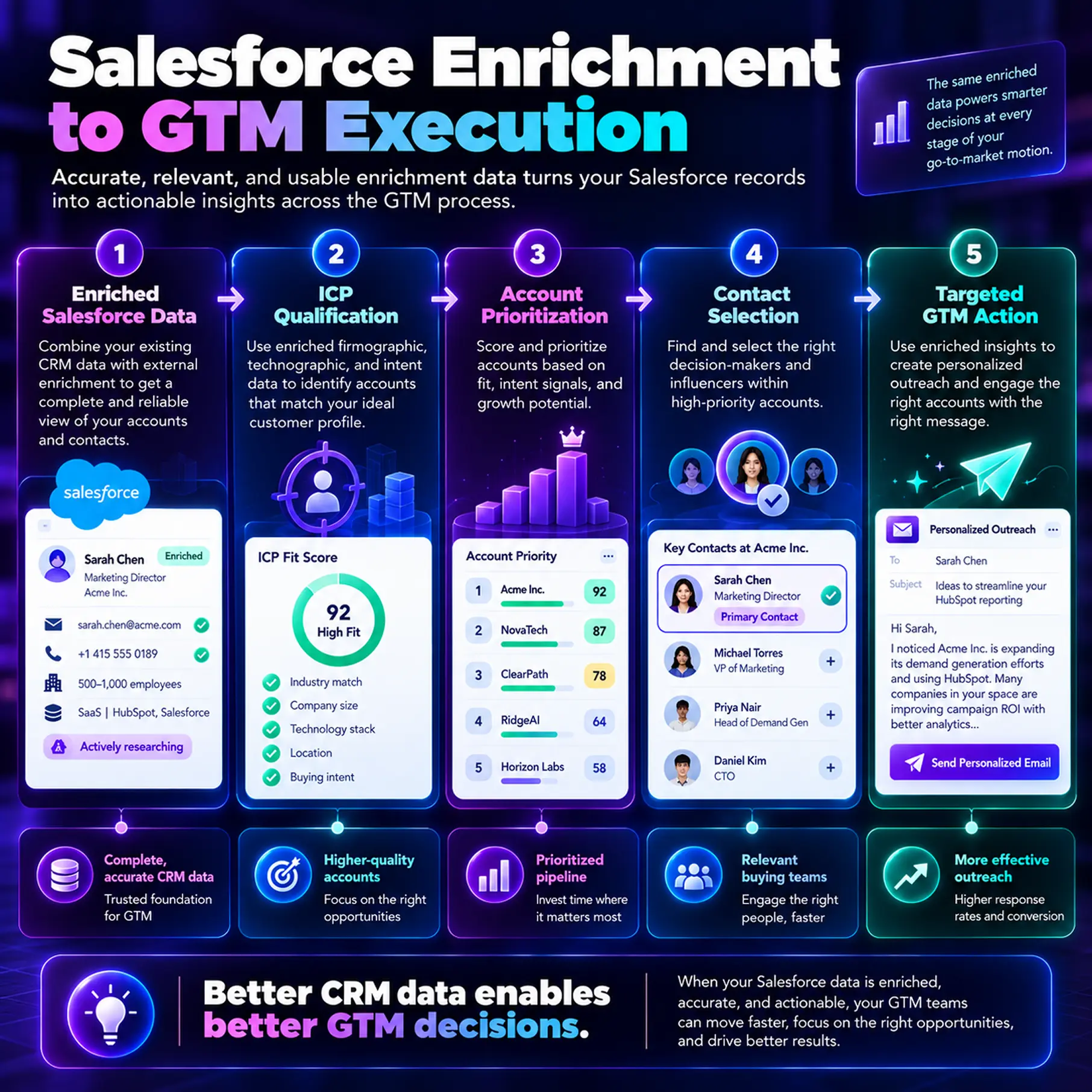
A Salesforce enrichment setup follows a defined sequence: identify the records that need data, match them to external profiles, retrieve the required information, map it to Salesforce, apply update rules, and monitor the results.
1. Select or Trigger Records
Enrichment begins when Salesforce records need additional or updated information. It can happen when a record is added, an existing record meets certain criteria, or a scheduled refresh is due.
Real-time enrichment is useful when data needs to support immediate qualification or routing. Scheduled enrichment helps keep records current, while batch enrichment suits large-scale cleanup or an initial enrichment exercise.
The choice depends on the workflow and how quickly the underlying information changes.
2. Match the Salesforce Record
The enrichment source uses available identifiers to find the corresponding external profile. Depending on the provider and record, these identifiers include an email address, company domain, company name, or contact name.
This is one of the most important parts of the process. A high match rate does not necessarily mean better results if some records are matched incorrectly. A wrong match can place valid information on the wrong Salesforce record.
Beyond external profile matching, Salesforce also provides matching rules that compare records based on defined fields and criteria, helping organizations identify and manage duplicates.
3. Retrieve the Required Data
After matching a record, the integration retrieves the attributes needed for the relevant workflow.
The required information varies by team. A prospecting workflow may need job title and seniority, while an account-based motion may rely more heavily on company characteristics, technology data, or buying signals.
Defining the required fields in advance keeps the enrichment process focused and makes it easier to control what enters Salesforce.
4. Map Data to Salesforce Fields
Map the retrieved information to the correct Salesforce objects and fields.
For example, employee count belongs on an account, while job title belongs on a contact. The mapping should also account for custom fields, permissions, validation rules, and existing Salesforce configurations.
A well-designed mapping makes enriched data usable across downstream workflows. Poor mapping can result in inconsistent values, misplaced information, or unnecessary duplicates.
5. Apply Ownership and Update Rules
Before automating enrichment, determine which system owns each field and under what conditions the enrichment source can update it.
An organization might allow an enrichment provider to populate empty fields while preventing it from overwriting information maintained by sales or RevOps. Certain records may also need to be excluded from enrichment.
These rules protect information teams already trust and clarify how to handle conflicts between internal and external data.
6. Write Back and Monitor
Once the data passes the controls, it writes to Salesforce. Then monitor the integration for failed matches, missing values, unexpected changes, and synchronization errors.
Monitoring is particularly important when enrichment runs at scale. A configuration problem that affects one record during testing can affect thousands of records after a full rollout.
Pro Tip- Set refresh schedules according to how quickly each type of information changes. Job titles and contact details may need more frequent updates than relatively stable company attributes.

What Data Can Be Enriched in Salesforce?
The fields worth enriching depend on what sales, marketing, and RevOps teams need to know about their target accounts and contacts.
Contact Data
Contact enrichment can include job title, seniority, department, phone number, and location. These details help sales teams identify relevant people and understand where a contact fits within the buying process.
Company and Firmographic Data
Company and firmographic enrichment can include industry, employee count, revenue, headquarters, and company size.
This information can support segmentation and ICP qualification by helping teams identify accounts that match defined characteristics, even when the original Salesforce record is incomplete.
Technographic Data
Technographic data describes the technologies an organization uses. For technology-focused products, it can indicate whether an account’s existing technology environment aligns with the product’s use case or integration requirements.
Intent and Buying Signals
Intent data adds behavioral context that static company and contact attributes cannot provide. Research activity, topic interest, and other buying signals can help distinguish accounts that appear similar based on firmographics but differ in their level of potential interest.
The most useful enrichment strategy usually supplies the information required for a specific workflow rather than trying to populate every possible field.
Salesforce Data Enrichment Integration Methods
Salesforce teams can use different approaches to bring enrichment data into their CRM. The best option depends on the data they need, the systems they use, the level of customization required, and how much control they want over the integration.
| Integration Approach | Best Fit | Main Consideration |
|---|---|---|
| Salesforce-native capabilities | Salesforce-centric teams | Available functionality |
| Managed Salesforce package | Deeper CRM integration | Configuration |
| API integration | Custom requirements | Development and maintenance |
| Middleware/connectors | Multiple systems | Added orchestration |
| Salesforce Data 360 | Broader data unification | Architecture and governance |
Salesforce-Native Capabilities
Native capabilities work when Salesforce supports the required data and workflows. Salesforce Data 360 supports enrichment that adds cleaned, harmonized data to Salesforce record experiences, including related lists and copy-field enrichments.
This approach can suit organizations that want enrichment closely connected to their existing Salesforce data environment.
Managed Salesforce Packages
Managed packages provide prebuilt connections between Salesforce and external platforms. They can reduce development effort compared with building an integration from scratch.
Teams still need to review supported objects, permissions, mappings, synchronization behavior, and maintenance requirements before enabling the connection.
API Integrations
APIs offer greater flexibility when a standard integration does not support a specific workflow or source.
That flexibility comes with additional technical responsibility. The team may need to manage authentication, data transfers, error handling, monitoring, and ongoing maintenance.
Middleware and Connectors
Middleware can coordinate Salesforce with several external systems and is useful when enrichment forms part of a larger GTM data architecture.
The trade-off is another layer that needs to be configured, monitored, and maintained.
Salesforce Data 360
Data 360 becomes more relevant when the requirement extends beyond individual enrichment workflows into broader data unification.
It can connect data from multiple sources and make harmonized information available across Salesforce experiences, making it a potential fit for organizations with more complex data architecture needs.
Pro Tip- Treat Salesforce as the system of record where appropriate and external providers as enrichment sources. Assign ownership at the field level so two systems do not end up competing to control the same information.
How to Evaluate Salesforce Data Enrichment Platforms
Choosing an enrichment integration requires more than comparing provider databases. The important question is whether the solution can deliver the right information into Salesforce, at the right time, without creating data-quality or governance problems.
| Criterion | What to Assess |
|---|---|
| Salesforce compatibility | Objects, fields, permissions, integration depth |
| Match quality | Account and contact identification |
| Data coverage | Target industries, regions, companies, personas |
| Freshness | Refresh frequency and update mechanisms |
| Field controls | Mapping, ownership, validation, overwrites |
| Automation | Real-time, scheduled, and batch options |
| Enrichment depth | Contact, firmographic, technographic, intent |
| Governance | Permissions, exclusions, auditability |
| Reliability | Error handling and monitoring |
| Cost | Credits, records, seats, API usage |
Start With Data Fit
Begin with the data gaps affecting your ICP and GTM processes.
A provider can have extensive overall coverage and still fall short if it lacks reliable data for your target industries, regions, company sizes, or personas. Define those requirements before comparing providers.
Assess Accuracy and Freshness
Accuracy determines whether information is correct when it enters Salesforce. Freshness determines whether it remains useful as people change jobs, companies evolve, and technology environments shift.
Test both using records that resemble your actual Salesforce database.
Examine Salesforce Controls
Review how the integration handles field mapping, overwrite rules, object support, permissions, exclusions, errors, and monitoring.
These details determine whether the solution fits your existing CRM governance model, rather than forcing administrators to create workarounds after deployment.
Test Before Scaling
Use a representative sample of Salesforce records before applying enrichment across the database.
The pilot should answer practical questions: Can the provider reliably match your records? Does it return the fields you need? Does the data fit your Salesforce configuration? What happens to existing values and duplicates? What will ongoing usage cost?
The answers give you a basis for defining rollout criteria before expanding the integration.
Salesforce Data Enrichment Platforms to Consider
Choosing a Salesforce enrichment platform can be difficult when providers offer overlapping capabilities but are built for different GTM needs. A platform that works well for broad contact coverage may not be the best choice for technographic intelligence, data quality, or multi-source enrichment.
The platforms below highlight these differences so you can compare their strengths and identify which option best matches your team’s specific requirements.
| Platform | Salesforce / Enrichment Focus | Best Fit |
|---|---|---|
| DiGGrowth | Data quality, ICP, account intelligence, GTM execution | CRM + account intelligence |
| ZoomInfo | B2B data and GTM intelligence | Broad enrichment and intent |
| Apollo | CRM enrichment and synchronization | Prospecting-led teams |
| Cognism | B2B contact intelligence | Global prospecting |
| Clay | Multi-source enrichment workflows | Flexible enrichment |
| Lusha | Contact and company enrichment | Targeted prospecting |
| HG Insights | Technology intelligence | Technology-based targeting |
DiGGrowth
DiGGrowth connects CRM data quality with ICP analysis, account intelligence, and GTM execution. ReachGen also connects with Salesforce and supports account intelligence and outbound workflows.
ZoomInfo
ZoomInfo is relevant for organizations seeking broad B2B data and intelligence, along with Salesforce connectivity.
Apollo
Apollo combines prospecting, enrichment, and Salesforce synchronization, including field mappings and enrichment of existing CRM records.
Cognism
Cognism focuses on B2B contact intelligence and Salesforce-connected prospecting workflows.
Clay
Clay supports multi-source enrichment workflows connected to Salesforce, including updating and upserting records.
Lusha
Lusha provides contact and company enrichment connected to Salesforce, including existing-record enrichment and field mapping.
HG Insights
HG Insights is relevant when technology adoption is central to account targeting, with technology intelligence connected to Salesforce workflows.
Rather than selecting a provider based only on the breadth of its database, compare each option against the fields, Salesforce objects, workflows, and governance requirements you identified earlier.
How to Implement Salesforce Data Enrichment
Implementation is easier when you define the CRM configuration before switching on the integration. The following steps provide a practical starting point.
Define What Salesforce Needs
List the Salesforce objects and fields that require enrichment and tie each one to a specific business use case.
For example, sales may need role and seniority information for contact selection, while RevOps may need firmographic data for segmentation and account qualification. This prevents teams from enriching fields simply because the provider offers them.
Establish Data Ownership
Decide which fields teams maintain internally and which the enrichment source can update.
Document ownership, overwrite rules, exclusions, and exceptions before enabling automation. Administrators and end users should have a shared understanding of what enrichment can and cannot change.
Run a Controlled Pilot
Start with a representative set of records rather than the entire CRM.
Use the pilot to confirm that matching, field mapping, update rules, permissions, and synchronization behave as expected in the Salesforce environment. Resolve configuration issues before expanding the rollout.
Connect Enrichment to GTM Processes
Enriched data becomes more useful when Salesforce processes use it.
Firmographic fields can support segmentation and account prioritization. Contact data can help identify relevant people, while technology and intent information can provide additional context for outbound execution.
The final step is not just writing data back to Salesforce, but also ensuring the teams responsible for acting on that data can access and use it.
Common Salesforce Enrichment Problems and How to Troubleshoot Them
When enrichment does not behave as expected, the provider is not always the source of the problem. Issues can arise from matching, mapping, Salesforce configuration, permissions, or synchronization.
| Problem | Possible Cause | What to Check |
|---|---|---|
| Records remain unenriched | Matching failure | Identifiers and match rules |
| Wrong records receive data | Weak matching | Match criteria and duplicate controls |
| Incorrect fields populate | Mapping issue | Source-to-target configuration |
| Existing values are replaced | Update configuration | Ownership and overwrite rules |
| Duplicate records appear | Poor deduplication | Salesforce duplicate controls |
| Data becomes stale | Insufficient refresh | Update cadence |
| Synchronization fails | Permission or connectivity issue | Integration settings and logs |
How to Measure the ROI of Salesforce Data Enrichment Integration
The number of records enriched tells you how much activity took place. It does not tell you whether the integration improved the business.
A more useful ROI assessment looks at three areas.
Data Quality
Track completeness, validity, duplicate rates, match quality, and freshness. These metrics show whether enrichment fills important data gaps, adds accurate information, matches records correctly, and keeps Salesforce records current. Comparing these measures before and after enrichment helps determine whether CRM quality has actually improved.
GTM Performance
Measure whether better data improves the workflows enrichment was intended to support. For example, teams can assess whether enrichment improves ICP-fit account identification, account prioritization, contact qualification, conversion rates, or pipeline contribution. These measures connect improved CRM information to tangible GTM outcomes.
Operational Efficiency
Measure the manual research time saved, records processed automatically, time spent preparing account and contact data, and cost per enriched record. These metrics show whether automation reduces repetitive work and lowers the effort required to maintain usable CRM data.
Together, these measures provide a clearer view of whether enrichment improves Salesforce data quality, supports GTM performance, and delivers measurable operational value.
Conclusion
Salesforce data enrichment integration works best when it is treated as part of the broader CRM and GTM data architecture rather than as a standalone data-push exercise.
The right approach depends on the gaps in your Salesforce data, the integration method that fits your architecture, the controls needed to protect CRM quality, and the workflows that will use the enriched information.
For organizations looking to connect CRM data quality with account intelligence and outbound execution, DiGGrowth combines enrichment-related capabilities with ICP Analytics and ReachGen.
Before scaling, identify your GTM data gaps, test the integration on representative Salesforce records, and establish clear ownership rules. Then measure its impact on CRM quality and GTM execution. With the right enrichment strategy, Salesforce can become more than a repository of contact and account records, it can provide the data foundation teams need to identify, prioritize, and act on the right GTM opportunities.
Ready to Get Started? Talk to Us!
To turn Salesforce data into actionable account intelligence, connect with DiGGrowth at info@diggrowth.com.
Ready to get started?
Increase your marketing ROI by 30% with custom dashboards & reports that present a clear picture of marketing effectiveness
Start Free Trial
Experience Premium Marketing Analytics At Budget-Friendly Pricing.

Learn how you can accurately measure return on marketing investment.
Lookalike Account Modeling for B2B Revenue Teams
Lookalike account modeling takes a different approach. It studies the attributes and outcomes of successful customers,...
Read full post post
You’re Targeting Your Ideal Customer. So Why Aren’t They Buying?
Your best customers reveal the traits associated with success. Your lost opportunities reveal where fit breaks...
Read full post post
How Predictive AI Will Transform Paid Media Strategy in 2026
Paid media isn’t a channel game anymore, it’s a chessboard. Search, social, programmatic, video, influencer, native,...
Read full post post