
7 Proven Data Quality Monitoring Tools Every Digital Business Needs in 2026
Reliable data is the foundation of every digital business. This article highlights seven proven data quality monitoring tools that catch errors before they affect your decisions. From real-time alerts to pipeline validation, these platforms help teams maintain trustworthy dashboards, optimize campaigns, and scale operations with confidence.
You can scale a digital business only when your data tells the truth. But here is the problem. Most businesses think their data is accurate. It is not.
If your dashboards look “off” or your campaigns show numbers that feel wrong, it is not your intuition. It is your data breaking silently in the background.
Ask yourself this:
How many decisions in your business rely on data every single day?
Marketing. Product. Sales. Finance. Customer success.
Almost everything.
Now imagine this: Your tracking pixel fails. Your CRM duplicates leads. Your pipeline is delayed by three hours. Your attribution breaks without warning. Your analytics tool misses key events on a high-traffic day.
What happens next?
Your marketing team pauses a winning campaign.
Your sales team works on low-quality leads.
Your dashboards mislead your founder.
Your projections fall apart.
This is not just a data issue.
This is a revenue problem.
In 2026, data quality is not a back-office function. It is a competitive advantage. The companies that win will be the ones that can trust every number inside their dashboards. The companies that lose will blame their teams for decisions that were based on incorrect data.
So here is the real question.
How do you ensure your data is accurate, reliable, and continuously monitored?
That is where data quality monitoring tools come in.
Key Takeaways
- Accurate, reliable data is essential for every decision in marketing, product, sales, and operations.
- Data issues often go unnoticed until they cause revenue-impacting mistakes.
- Data quality monitoring tools alert teams to anomalies, pipeline failures, and integration errors before dashboards break.
- Investing in data quality monitoring transforms reporting from reactive troubleshooting to confident, insight-driven decision-making.
What Data Quality Really Means and Why Monitoring Matters
Before you explore any tool, you must understand the core issue: what does “data quality” actually mean?
Data quality is not about having a lot of data. It is about having data that your business can trust. Your data must be complete, consistent, timely, accurate, and aligned across every system you use. When any one of these breaks, your entire analytics foundation becomes unreliable.
Think of it like this. You can have the best dashboard, the best analytics team, and the best automation. But if the data feeding those systems is incorrect, everything built on top of it collapses. You cannot optimize campaigns. You cannot measure attribution. You cannot forecast revenue. You cannot diagnose performance problems.
This is where things get even more critical.
Data issues rarely announce themselves.
They do not show a pop-up.
They do not send a warning.
They stay hidden until your metrics stop making sense.
That is why modern digital businesses use data quality monitoring tools. These tools track the health of your data the same way you track the performance of your campaigns. They watch for anomalies, missing values, schema changes, integration failures, tracking issues, attribution gaps, and pipeline delays. As soon as something breaks, these tools alert your team, preventing incorrect data from affecting your decisions.
In simple words the data quality monitoring tools:
- Protect your dashboards, your insights, and your revenue.
- Ensure that your business does not discover a problem after the damage is done.
- Help every team make confident, accurate, data-backed decisions.
And in 2026 and beyond, they will no longer be optional. They will be essential for any digital business that wants to scale without breaking its analytics foundation.
1. DiGGrowth
Every digital business eventually faces the same problem: your data looks right until the day it destroys a major decision.
One dashboard shows one number.
Your ad platforms show another.
Your CRM tells a completely different story.
And your team wastes hours debating which number to trust instead of fixing the root cause.
This is not a reporting problem. This is a data reliability problem. And DiGGrowth exists to solve exactly that.
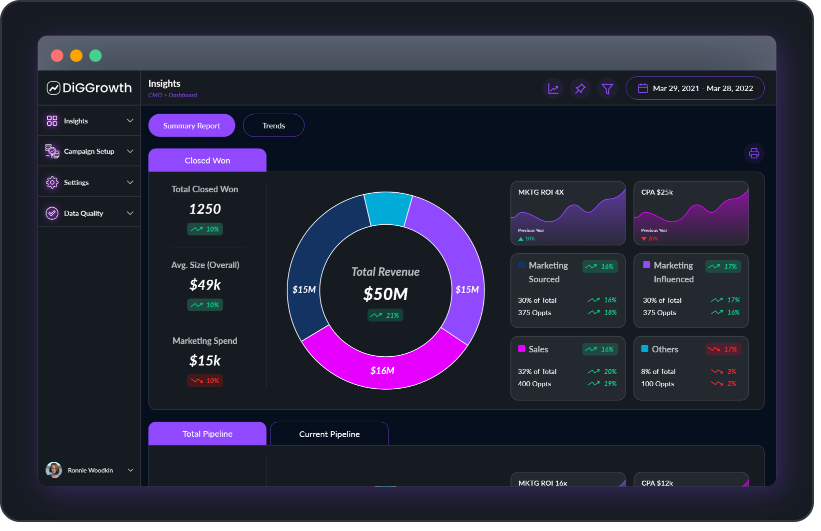
DiGGrowth is a unified analytics and data quality monitoring platform designed specifically for performance-driven teams. Unlike traditional analytics tools, it tracks marketing data, product events, CRM updates, and attribution signals all in one place. This holistic approach ensures your data flows seamlessly and remains reliable across platforms.
DiGGrowth monitors every stream of your marketing, product, and CRM data and alerts you the instant something breaks, drops, delays, or silently stops recording. It is the difference between finding out too late and fixing things before they cost you money.
DiGGrowth gives you visibility into the quality of your data before it reaches your dashboards. That visibility is what prevents expensive mistakes.
Why DiGGrowth Matters
Digital brands operate in real time. Campaigns run daily, experiments never stop, and leaders expect accurate numbers at every checkpoint. DiGGrowth fits perfectly into that environment because it keeps your tracking health visible at all times. When an event breaks, a pixel drops, or an integration starts misfiring, DiGGrowth catches it before it impacts your dashboards or revenue models.
Business Impact
When you rely on accurate data, you make accurate decisions. DiGGrowth prevents scenarios like:
- Your team pausing a strong campaign because the conversion event failed.
- Attribution models shifting because UTMs were incorrect.
- CRM receiving incomplete leads that sales cannot use.
- Leadership reviewing dashboards built on missing, delayed, or corrupted data.
When your data foundation is clean, your decisions become accurate.
Example: What This Looks Like in Real Life
Imagine you are preparing a monthly performance report and notice the usual chaos: Facebook is showing leads that your CRM is missing, your UTMs are inconsistent across campaigns, and your form submissions appear lower than expected.
DiGGrowth steps in and:
- It detects that your “Lead Submitted” event has been firing intermittently and highlights the exact sessions where it failed.
- It flags inconsistencies in your UTMs, showing which campaigns are using incorrect parameters that would break attribution.
- It identifies CRM fields that are missing or mapped incorrectly, which explains why certain leads are not syncing into your pipeline view.
- It validates cost, click, and conversion data across your ad platforms to ensure they match your analytics environment.
By the time you sit down to build your dashboard, everything is synchronized, validated, and quality-checked. You are no longer fixing data. You are interpreting it.
Who Should Use DiGGrowth?
Growth marketers, product teams, revenue leaders, any stakeholder who depends on accurate, real-time data to steer decisions. If your business cannot afford misleading data and flawed dashboards, DiGGrowth serves as your trusted watchdog, continuously protecting your data integrity before it impacts your bottom line.
2. Monte Carlo

If your business relies on pipelines, warehouses, and dashboards, you already know one painful truth: data breaks in silence. Tables stop updating. Jobs fail at midnight. Your metrics look stable until the very moment a decision depends on them.
Monte Carlo solves this by acting as the reliability layer for your entire data ecosystem. It monitors every pipeline, every table, and every transformation, and alerts you the moment something looks wrong. Not after a report fails. Not after a campaign misfires. Before the damage reaches your teams.
Monte Carlo tracks freshness, volume, schema changes, anomalies, and unexpected patterns across your data stack. If a pipeline is delayed, if a column disappears, or if an integration drops half its records, Monte Carlo catches it instantly.
Key Features
- Monitors freshness, volume, and schema changes across all data tables.
- Detects anomalies and irregularities in pipelines before they impact reports.
- Provides lineage visibility so teams understand how data moves across systems.
- Offers automated alerts for job failures, missing values, or unexpected data drops.
- Integrates with modern warehouses, BI tools, and data orchestration platforms.
Benefits
- Reduces time spent troubleshooting broken pipelines.
- Ensures dashboards reflect accurate and timely data.
- Helps teams identify the root cause of failures instantly.
- Prevents misleading insights caused by stale or incomplete data.
- Builds trust in your data workflows across product, engineering, and analytics teams.
Who Will Benefit Most?
Data teams, analytics engineers, and any business where pipelines power daily decisions. If your company depends on reliable data infrastructure, Monte Carlo acts as the guardian that prevents silent failures from turning into expensive mistakes.
3. Google Looker Studio
Google Looker Studio turns raw performance data into clean, shareable dashboards that help teams view their paid media performance in real time. It centralises metrics from multiple channels and converts them into structured visual stories that decision makers can understand quickly.
Core Strengths
- Connects to almost every major ad, analytics, and CRM platform.
- Builds custom layouts that match your reporting structure.
- Allows automated refresh so your dashboards stay updated without manual work.
- Supports advanced filters that allow teams to slice and compare performance across periods and campaigns.
How Teams Use It
- Create weekly or monthly reporting dashboards for leadership.
- Visualise cross-channel spend, conversions, CTR, ROAS, and pipeline contribution.
- Track performance against internal targets using scorecards and conditional formatting.
- Share live dashboards with stakeholders through links, no file downloads required.
Benefits For Paid Media Teams
- Reduces hours spent manually exporting spreadsheets.
- Improves clarity by presenting data in consistent visual formats.
- Provides accurate, always-on insights for faster optimisation.
- Enables teams to explain performance clearly using unified views instead of scattered reports.
4. Supermetrics

Paid media teams deal with scattered data. Platforms report differently. Metrics break. Time is lost in exports. Supermetrics removes that friction by pulling clean, consistent data into a single workspace so reporting becomes predictable and scalable.
How It Works
Supermetrics connects your ad platforms, analytics tools, and CRM sources, then pipes that data into Google Sheets, Excel, Looker Studio, BigQuery, or a warehouse. It standardizes naming, aligns metrics, and keeps everything updated through automated refresh schedules.
Why Teams Rely On It
- They get accurate performance numbers without manual checks.
- They build reporting systems that scale across campaigns, regions, and teams.
- They eliminate time wasted on repetitive exports.
- They maintain continuity even when platforms change APIs or break fields.
Marketing Impact
Supermetrics strengthens reporting quality, speeds up insight generation, and supports stronger optimization decisions. Teams spend less time collecting data and more time understanding what drives growth.
5. Improvado
Improvado gives paid media teams a way to manage complex, multi-platform data without building pipelines or relying on engineering. If your reporting depends on dozens of channels, changing budgets, and evolving campaign structures, Improvado keeps everything aligned so your insights stay accurate.
How It Organizes Your Data
Instead of pulling raw numbers and fixing them manually, Improvado maps metrics, standardizes naming, and merges data from every ad platform into a unified model. It then pushes this refined data into your BI tool or warehouse, keeping your reporting layer clean and reliable.
Why It Gives Marketing Leaders Confidence
- Every source stays synced in real time.
- Teams avoid inconsistent metric definitions across dashboards.
- Large datasets run smoothly without manual intervention.
- Reports stay stable even when platforms update or deprecate fields.
Benefits for Paid Media Teams
Improvado improves reporting accuracy, reduces operational load, and gives teams the scale they need to analyze large cross-channel ecosystems. It turns fragmented data into a structured foundation that supports smarter, faster decision-making.
6. Fivetran
Every digital business struggles with moving data reliably from multiple sources into a central warehouse.
Pipelines break. Integrations fail. Data arrives late or incomplete.
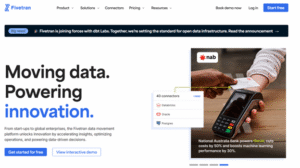
Fivetran solves this by fully automating the extraction, transformation, and loading process, giving teams confidence that their warehouse always has clean, current data.
How It Works
Fivetran connects to hundreds of sources, from CRMs to ad platforms to analytics tools. It handles schema changes automatically, updates tables incrementally, and ensures that data pipelines run without requiring manual fixes. Essentially, it eliminates the silent failures that often corrupt dashboards.
Key Value for Teams
- Automates and maintains ETL pipelines without engineering overhead.
- Keeps data current and consistent across all platforms.
- Detects and adjusts for schema changes automatically.
- Reduces risk of stale, missing, or misaligned metrics.
Impact on Decision-Making
When pipelines are reliable, marketing, product, and growth teams stop chasing ghosts in their dashboards. Campaign performance, pipeline reporting, and attribution become trustworthy, and leadership can make decisions based on actual results rather than guessing which data is correct.
7. Datafold
Even small changes in pipelines can silently break your data. One overlooked transformation or one untested deployment can cause reports to misfire, dashboards to mislead, and teams to make decisions based on faulty numbers. Datafold exists to prevent these silent disasters before they reach your stakeholders.
How It Protects Your Data
Datafold continuously monitors data pipelines and highlights differences between versions of tables, transformations, and datasets. It automates regression testing for analytics, ensuring that any update in your ETL or warehouse does not introduce errors. Instead of discovering problems after the fact, teams are alerted immediately.
Why Growth Teams Rely on It
- Detects pipeline regressions automatically.
- Compares changes across datasets to spot discrepancies before they affect dashboards.
- Integrates with modern warehouses like Snowflake, BigQuery, and Redshift.
- Ensures confidence in every metric used for campaigns, product insights, and reporting.
Pro Tip- By catching hidden pipeline failures before they propagate, Datafold saves time, protects revenue, and reduces risk. Teams stop firefighting broken data and start interpreting insights with confidence, making smarter marketing, product, and growth decisions without fear of silent errors.
Conclusion
Data in a digital business is only valuable if it can be trusted. When teams operate with confidence in their metrics, decisions happen faster, campaigns perform better, and resources are allocated wisely. Tools like DiGGrowth, Monte Carlo, Fivetran, and others do more than just monitor, they actively safeguard the integrity of your entire data ecosystem. They help your teams act decisively, optimize continuously, and focus on growth instead of firefighting errors hidden in your pipelines.
Our experts at DiGGrowth can help you build a fully monitored, error-proof data ecosystem. Talk to us today at info@diggrowth.com and let’s make every decision count.
Ready to get started?
Increase your marketing ROI by 30% with custom dashboards & reports that present a clear picture of marketing effectiveness
Start Free Trial
Experience Premium Marketing Analytics At Budget-Friendly Pricing.

Learn how you can accurately measure return on marketing investment.

How Predictive AI Will Transform Paid Media Strategy in 2026
Paid media isn’t a channel game anymore, it’s a chessboard. Search, social, programmatic, video, influencer, native,...
Read full post post
Don’t Let AI Break Your Brand: What Every CMO Should Know
AI isn’t just another marketing tool. It’s changing how we connect with customers, personalize content, and...
Read full post post
From Demos to Deployment: Why MCP Is the Foundation of Agentic AI
A quiet revolution is unfolding in AI. And it’s not happening inside research labs. For decades,...
Read full post postFAQ's
Data quality monitoring tools work best when set to run continuously. Real-time alerts help catch anomalies as they happen. Regular audits and monthly reviews ensure that rules, pipelines, and integrations remain aligned, keeping your dashboards accurate and reducing the risk of hidden errors.
Even small businesses rely on accurate reporting for growth. Data monitoring tools prevent wasted budget, improve campaign decisions, and ensure CRM and analytics systems are aligned. Early adoption helps small teams scale efficiently without risking decisions based on flawed data.
Most modern data quality monitoring tools are designed for minimal engineering dependency. Platforms like DiGGrowth and Monte Carlo automate anomaly detection, alerting, and pipeline checks, allowing marketing, analytics, and product teams to maintain data integrity without heavy technical involvement.
Silent pipeline failures, intermittent tracking errors, schema changes, and misaligned UTMs are notoriously difficult to catch manually. Without automated monitoring, these subtle issues often go unnoticed until reports mislead decision-makers or campaigns underperform, impacting revenue and team efficiency.
Most tools provide seamless integrations with CRMs, ad platforms, warehouses, and BI dashboards. They standardize metrics, validate event tracking, and offer automated alerts. This ensures consistent, reliable data flows across systems, so teams can trust insights without manual reconciliation or error-prone exports.