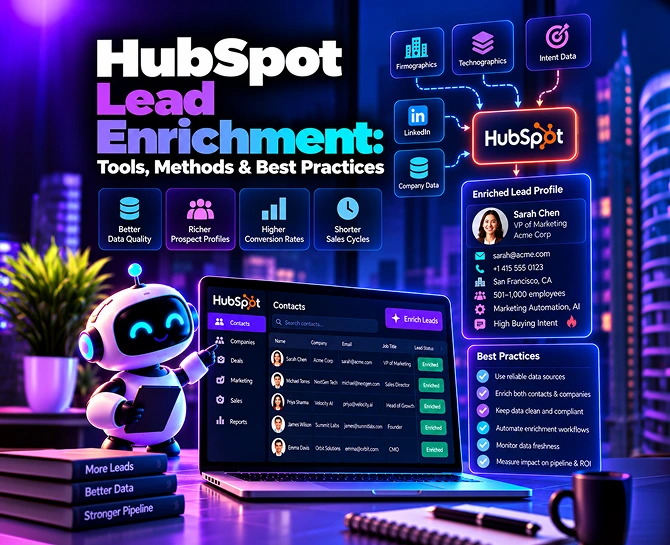
Why HubSpot Lead Enrichment Matters
HubSpot lead enrichment adds or refreshes contact, company, firmographic, technographic, and other business data in HubSpot. Learn how native enrichment works, how third-party tools compare, what to evaluate before choosing a provider, and how to maintain high-quality enriched data.
A complete HubSpot database can still be a weak foundation for GTM execution when its data is inaccurate, outdated, or incomplete. Contacts change roles, companies grow, technologies evolve, and business information quickly becomes stale.
A HubSpot lead enrichment tool can add or refresh contact, company, firmographic, technographic, and other relevant data, giving sales and marketing teams better context for qualification, segmentation, routing, personalization, and prospecting.
More data is not necessarily better data. Enrichment creates value only when the information is accurate, current, and relevant to the decisions your team needs to make.
For some teams, HubSpot’s native enrichment may be enough to fill missing fields. Others may need broader data coverage, deeper intelligence, or prospecting capabilities from a third-party platform. The right approach depends on the data gaps, GTM use cases, and level of intelligence required.
Key Takeaways
- Prioritize enrichment fields based on the GTM decisions they support, such as qualification, routing, segmentation, personalization, or prospecting.
- Choose between native HubSpot enrichment and third-party platforms based on your required data coverage, intelligence, and workflow complexity.
- Evaluate providers on accuracy, coverage, freshness, HubSpot integration, automation, governance, and the cost of usable enriched records.
- Test platforms using representative CRM records, including incomplete, older, and difficult-to-match records, rather than relying only on product demos.
- Measure enrichment value by connecting better data quality to tangible GTM outcomes rather than evaluating platforms solely by the number of fields they provide.
What is a HubSpot Lead Enrichment Tool?
A HubSpot lead enrichment tool is software that automatically adds, updates, verifies, or maintains information associated with leads, contacts, and companies in HubSpot.
Depending on the provider, this may include contact, company, firmographic, technographic, organizational, intent, and account intelligence data. HubSpot’s native enrichment can match contacts using details such as name and work email, while company enrichment can use the company domain. Third-party platforms may support additional identifiers and matching methods.
The platform matches records against available data sources and returns information that can be written back to HubSpot. Some tools focus on keeping CRM records complete, while others combine enrichment with prospecting, account intelligence, intent data, or broader GTM processes.
How Does Lead Enrichment Work in HubSpot?
HubSpot offers several ways to enrich eligible contact and company records, from automated updates to bulk enrichment. The right approach depends on how your team manages and maintains CRM data.
Automated Enrichment
Automatic enrichment can populate eligible records when they are created or when enrichment settings are enabled. It fills empty properties without overwriting existing values from users or other systems, reducing manual research and adding useful business context earlier in the GTM process.
Continuous Enrichment and Data Refresh
Continuous enrichment can update previously enriched records when new information becomes available. HubSpot currently describes this as monthly updates to previously enriched properties when new data is available. This helps keep changeable data, such as job titles and company attributes up to date. Availability and behavior depend on the subscription, property, and record type.
Bulk Enrichment and Ongoing Refresh
HubSpot supports bulk enrichment of eligible records through CRM indexes, segments, and imports, depending on the enrichment method being used. Teams can also check record eligibility and available enrichment data before running enrichment, making native enrichment useful for maintaining CRM data without adding a separate platform.
What Data Can You Enrich in HubSpot?
The data you should enrich depends on how your team uses HubSpot. Common enrichment categories include:
| Data Category | Examples | Common GTM Use |
|---|---|---|
| Contact Data | Job title, seniority, professional details | Lead qualification, routing, personalization |
| Firmographics | Industry, company size, revenue, location | ICP filtering, segmentation, prioritization |
| Technographics | Technologies used by a company | Account targeting, competitive positioning |
| Company Data | Company description, domain, business attributes | Account qualification and research |
| Intent & Buying Signals | Research or behavioral signals available through relevant HubSpot or third-party capabilities | Account prioritization and outreach timing |
| Organizational Data | Departments, roles, organizational changes | Buying-group identification and targeting |
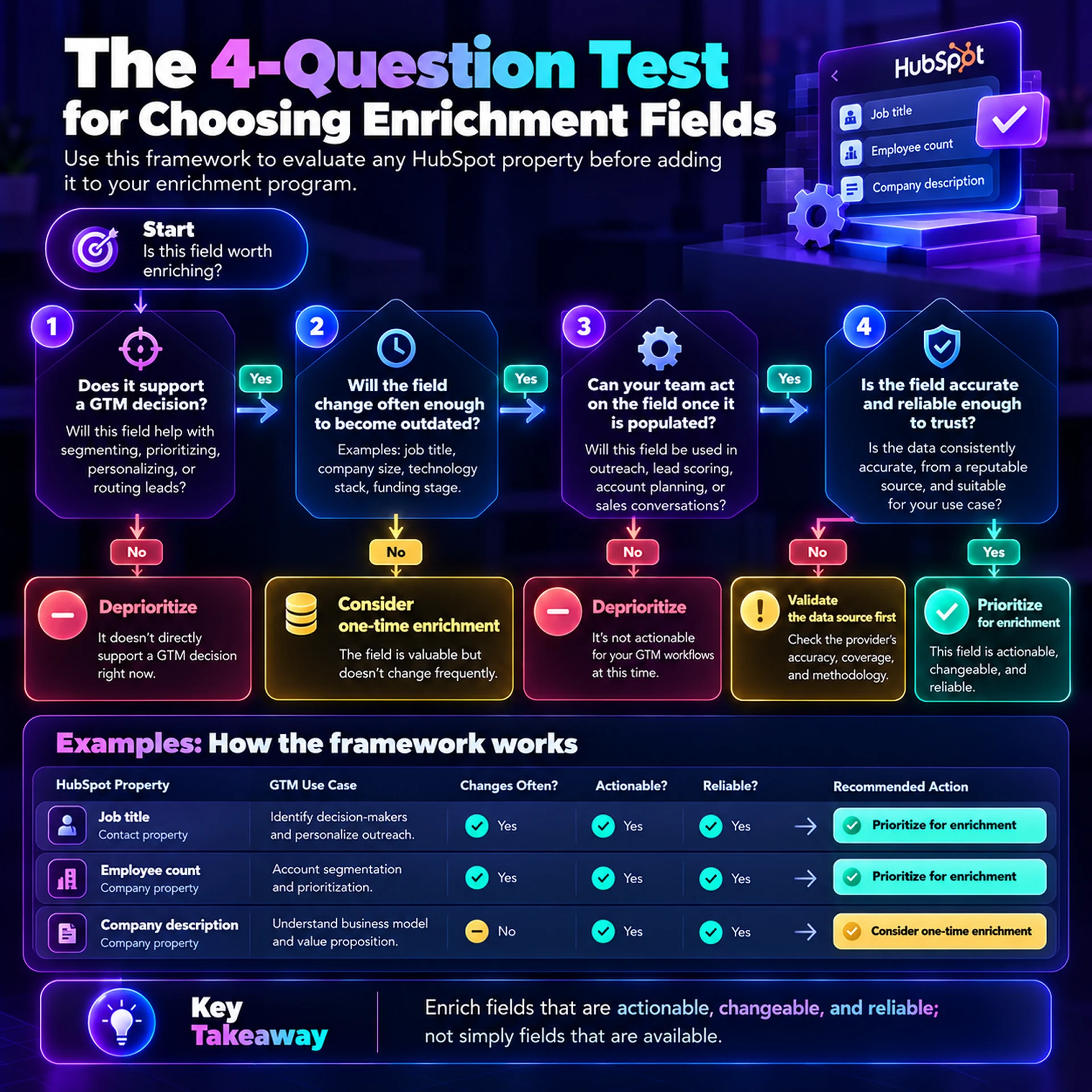
Which Fields Should You Enrich First?
Prioritize fields that directly support GTM decisions. If sales teams qualify companies by employee count, industry, geography, and seniority, prioritize these over attributes that rarely influence action.
A practical priority order is:
- Qualification
- Segmentation and routing
- Personalization
- Account research
- Useful but rarely actionable fields
Does HubSpot Have a Native Lead Enrichment Tool?
Yes. HubSpot offers native data enrichment for eligible contact and company records. Teams can enrich records individually or in bulk, use automatic enrichment, and enable continuous enrichment where supported.
Native enrichment works well when the goal is to keep HubSpot records populated with standard business information without adding another platform.
However, teams needing broader data coverage, multi-source enrichment, specialized account intelligence, prospect discovery, advanced intent data, or flexible workflows may benefit from a third-party platform.
The right choice depends on what your GTM team needs the enriched data to accomplish, not whether native or third-party enrichment is inherently better.
Native HubSpot Enrichment vs. Third-Party Tools
The choice depends on whether you need standard CRM enrichment within HubSpot or additional data, intelligence, and workflows from an external provider.
| Factor | Native HubSpot Enrichment | Third-Party Enrichment |
|---|---|---|
| HubSpot Integration | Built into HubSpot; suitable for teams prioritizing native workflows | Requires an integration; useful when external capabilities justify the added setup |
| Setup | Generally simpler to configure and manage | May require additional configuration and administration |
| Standard CRM Data | Available for eligible records and properties; suitable for core enrichment needs | Coverage varies by provider; useful when you need specific additional fields |
| Data Sources | Uses sources available through HubSpot’s enrichment capabilities | Some providers combine external data sources for broader coverage |
| Advanced Intelligence | Depends on available HubSpot capabilities | May suit teams needing additional account, intent, or GTM intelligence |
| Prospecting | Focused on CRM enrichment | Some platforms combine enrichment with prospect discovery |
| Customization | Centered on HubSpot properties and workflows | Options vary by provider, integration, and API |
| Best Fit | Teams prioritizing simplicity and native CRM enrichment | Teams needing data or specialized GTM capabilities beyond HubSpot |
How to Choose: Favor native enrichment when simplicity and HubSpot-native management are the priority. Consider third-party enrichment when additional data, intelligence, prospecting, or workflows address a specific gap in your HubSpot setup.
What Should You Look for in a HubSpot Lead Enrichment Tool?
Choosing an enrichment provider requires more than comparing the number of fields it offers. Evaluate whether the data is reliable, actionable, and easy to maintain within your GTM workflows.
Data Accuracy and Coverage
Assess match rates, field-level accuracy, and contact and company coverage across the industries, geographies, and company types relevant to your ICP. Also test difficult-to-match records and duplicate handling, as weak performance can create additional CRM cleanup.
Data Freshness and Enrichment Depth
Data becomes outdated as people change roles, companies grow, and technologies evolve. Check how often key fields are refreshed and whether stale records can be re-enriched. If your GTM workflows require deeper intelligence, assess coverage beyond basic contact information.
HubSpot Integration and Automation
The integration should fit naturally into existing HubSpot workflows. Check how records sync, fields map, and enrichment triggers. Also evaluate bulk enrichment, duplicate prevention, error handling, and controls over which fields can be updated.
Data Provenance, Governance, and Cost
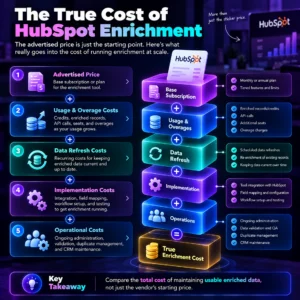
Review data sources, privacy controls, update behavior, admin permissions, field-level controls, and usage limits. Compare the cost of successfully enriched, usable records rather than just the advertised subscription, including refresh, overage, implementation, and administration costs.
GTM Usefulness
Enrichment should improve a specific GTM decision, such as qualification, segmentation, prioritization, routing, personalization, or prospecting. Identify the fields your team actually uses and evaluate whether better data improves those decisions.
Pro Tip- Export a representative HubSpot sample before evaluating vendors. Mark the fields used for qualification, routing, segmentation, or outreach to create a practical benchmark for comparing providers.
HubSpot Lead Enrichment Tools Compared
HubSpot lead enrichment tools vary in the type of data they provide, how they integrate with HubSpot, and the GTM problems they are designed to solve. Some focus on keeping CRM records complete and current, while others combine enrichment with prospecting, account intelligence, lead routing, or API-based data services.
The right choice depends on the data gaps your team needs to address and how you will use enriched data.
| Platform | Primary Use Case | Data and Intelligence | HubSpot Integration | Pricing Model |
|---|---|---|---|---|
| DiGGrowth | Data quality and GTM intelligence | Firmographic, technographic, and GTM intelligence | HubSpot integration | Contact sales |
| ReachGen | ICP-based account discovery, enrichment, and prospecting | Contact, firmographic, technographic, and account intelligence | HubSpot integration | Contact sales |
| HubSpot Data Enrichment | Native CRM enrichment | Contact, company, firmographic, and technology data | Built into HubSpot | Included with eligible plans |
| Apollo | Contact enrichment and outbound prospecting | Contact, firmographic, and technographic data | HubSpot integration | Free and paid plans |
| Clay | Multi-source data enrichment | Contact, company, firmographic, and multi-source data | HubSpot integration | Credit-based |
| ZoomInfo | Enterprise B2B data and intelligence | Contact, firmographic, technographic, and intent-related intelligence | HubSpot integration | Custom |
| Cognism | Contact data and international prospecting | Contact, firmographic, technographic, and intent-related data | HubSpot integration | Custom |
| LeadAngel | Enrichment, account matching, and lead routing | Contact, firmographic, and account-matching data | HubSpot integration | Custom |
| People Data Labs | API-based data enrichment | Person, company, and firmographic data | API or connector | Usage-based/custom |
Note: Capabilities and pricing can vary by plan, region, and product package. Verify current vendor documentation before deciding.
Which HubSpot Lead Enrichment Tool is Right for Your Team?
There is no single best HubSpot lead enrichment tool for every team. The right platform depends on the data you need, the systems you already use, and the GTM decisions the enriched data must support.
| Primary Requirement | Best-Fit Tool Category |
|---|---|
| Native HubSpot enrichment | HubSpot-native enrichment |
| Outbound sales and enrichment | Sales intelligence and prospecting platform |
| Multi-source enrichment | Multi-source enrichment platform |
| Enterprise data and intelligence | Enterprise B2B data platform |
| Data quality and GTM intelligence | GTM intelligence and data quality platform |
| ICP-based account discovery and prospecting | AI prospecting and account intelligence platform |
| API-first enrichment | API-based data enrichment platform |
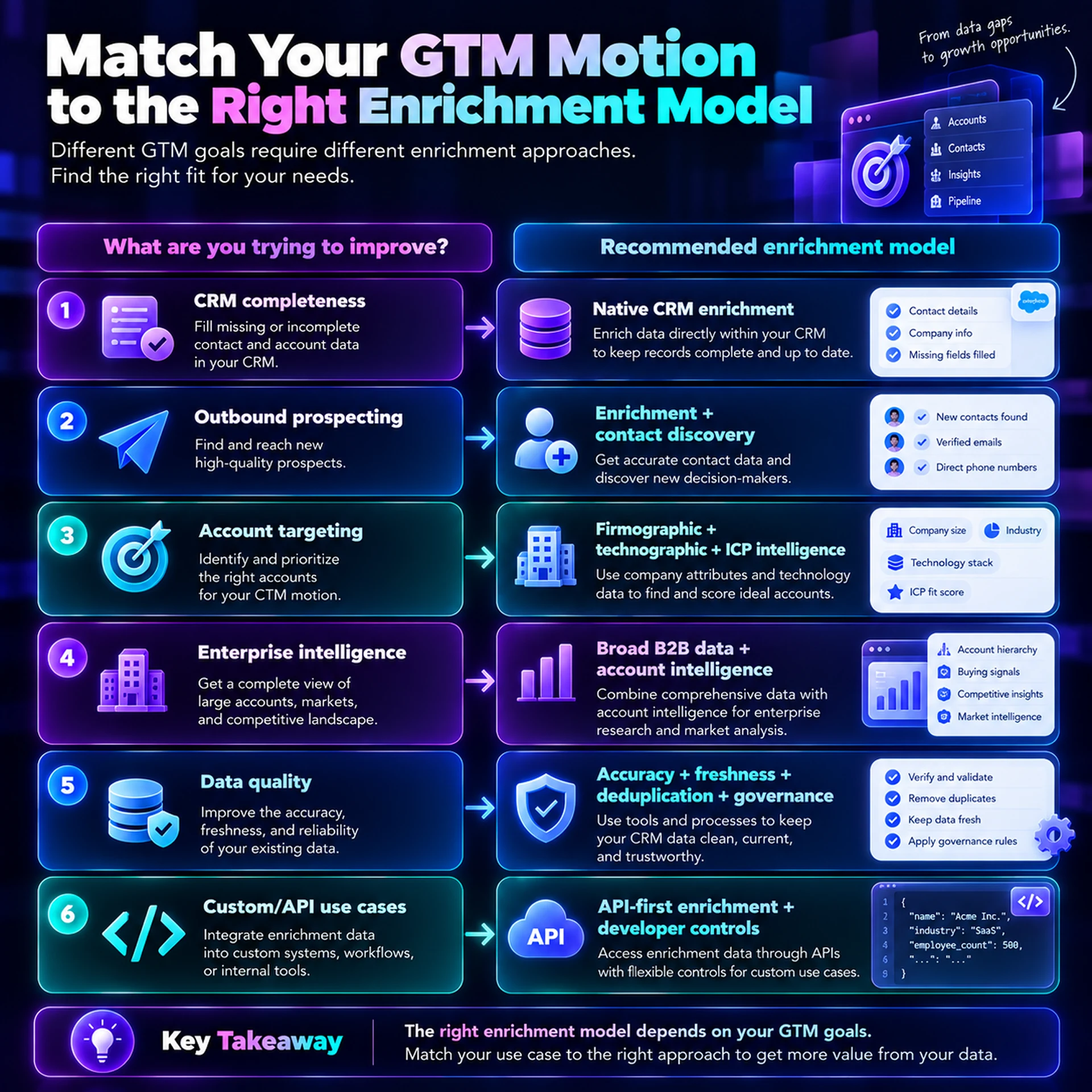
Match the Tool to Your GTM Motion
Inbound Qualification: Prioritize accurate contact and company data that helps sales teams qualify and route leads.
Outbound Prospecting: Look for enrichment combined with contact discovery, account research, and prospecting capabilities.
ABM and Account Targeting: Prioritize firmographic, technographic, account intelligence, and ICP-related data that helps identify high-fit accounts.
Enterprise Intelligence: Look for broad data coverage, deeper account intelligence, geographic coverage, and strong data governance.
Data Quality: Prioritize accuracy, freshness, coverage, duplicate handling, and controls over how enriched data updates HubSpot.
API-Driven Use Cases: Evaluate API availability, scalability, documentation, response quality, rate limits, and developer controls.
How to Test a HubSpot Lead Enrichment Tool Before You Buy
A vendor pilot should answer one question: How well does this platform perform on the records your team actually cares about?
Do not evaluate an enrichment provider only through a product demo or a list of available fields. Test it against representative HubSpot data and compare the results against the quality and workflow requirements you defined before the evaluation.
Build a Representative Test Sample
Your sample should reflect the range of records the platform will encounter after deployment. Include complete and incomplete records, older and recently created records, different industries and company sizes, different geographic markets, and records with limited identifiers.
Also include difficult-to-match records because they reveal where a provider’s coverage weakens. Most importantly, include records where your team already knows the correct answer. These create a ground-truth benchmark for distinguishing between a populated field and an accurate one.
Measure Data Quality
| Metric | What it Tells You |
|---|---|
| Match Rate | How often the platform identifies the correct record |
| Field Completion | How much missing information is added |
| Field-Level Accuracy | Whether individual returned values are correct |
| Overall Accuracy | Whether the enriched record is reliable as a whole |
| Freshness | How current the returned information is |
| Coverage | How consistently the platform handles your target records |
| Duplicate Rate | Whether enrichment introduces or prevents duplicates |
| Source Transparency | Whether you can understand where important data comes from |
These metrics should be evaluated together. A high match rate does not guarantee accurate fields, while high field completion does not necessarily mean the returned data is useful. The goal is to determine whether the resulting records are sufficiently reliable to support the GTM decisions they support.
Do not confuse completion with quality. A provider that fills 90% of fields is not necessarily better than one that fills 70% if a meaningful share of the first provider’s values are inaccurate or outdated.
Test the HubSpot Experience
Evaluate the CRM workflow, not just the enrichment output. Check how fields are mapped, and records are synchronized, whether enrichment can be automated, and how existing values are handled.
Also assess how workflows trigger enrichment, how errors are surfaced, what administrative controls are available, and whether updates can create duplicate records.
This matters because an enrichment platform can produce strong data while still creating operational friction. The best integration is one your RevOps team can operate without constant manual intervention.
Calculate the Real Cost
Pricing models can make vendors difficult to compare directly. Some charge by credits, records, users, API usage, or a combination of factors.
Calculate:
Cost per usable enriched record = Total enrichment cost ÷ successfully enriched and usable records
Treat a record as usable only when it is successfully matched and the returned data is accurate enough to support the intended GTM use case. This provides a more meaningful comparison than looking at the advertised price or total number of records processed.
Also account for unsuccessful matches, duplicate records, unused credits, refresh costs, additional seats, API usage, implementation effort, and ongoing administration.
HubSpot Lead Enrichment Best Practices
The quality of an enrichment strategy depends on how the data is used after it enters HubSpot. A well-designed process should protect trusted CRM data, focus enrichment where it can influence GTM decisions, and establish clear rules for keeping important fields current.
Protect First-Party Data
Define which HubSpot properties enrichment can update and which should remain under the control of internal teams or trusted first-party sources. This prevents automated enrichment from unintentionally replacing information your team considers authoritative.
Use field-level rules and overwrite controls where available, and establish ownership for important properties so teams know which source to trust when systems return conflicting values.
Prioritize High-Value Records
Not every record requires the same level of enrichment. Prioritize records where better data can influence an immediate GTM action, such as high-value accounts, active opportunities, target ICP accounts, high-intent leads, records entering sales workflows, or accounts with significant data gaps.
This can make enrichment more cost-effective because resources are concentrated where additional information is most likely to change an outcome.
Keep Data Fresh
CRM data can become outdated as people change roles, companies expand, and technology stacks evolve. Set refresh intervals for fields that are likely to change and monitor data quality regularly to identify stale or inaccurate information.
Different data points become outdated at different rates. Job titles change more frequently than company attributes, while technology adoption and organizational structures can shift as businesses evolve. Set refresh intervals according to how quickly each field typically changes to keep your HubSpot data accurate and actionable.
Connect Enrichment to GTM Actions
Enrichment should have a clear purpose within your GTM strategy. Before adding new fields, identify the sales or marketing decision each field will influence, who will use the information, and what action should follow from it.
For example:
- Employee count → ICP qualification
- Seniority → lead routing
- Technology adoption → account prioritization
This approach prevents enrichment from becoming a data collection exercise. A field is worth maintaining when your team can use it to make a better decision, trigger a relevant action, or prioritize limited sales and marketing resources.
Conclusion
Choosing a HubSpot lead enrichment tool should start with the data gaps your team needs to address and the GTM decisions that depend on that data. Native HubSpot enrichment can be a practical choice for standard CRM data, while third-party platforms can be useful when you need broader coverage, deeper intelligence, prospecting capabilities, or specialized enrichment.
Before committing to a platform, test it against representative CRM records and evaluate accuracy, coverage, freshness, integration, cost, and GTM usefulness. This gives your team a clearer view of whether the enriched data will create measurable value.
If you are looking to improve HubSpot data quality and turn incomplete CRM records into more actionable GTM intelligence, DiGGrowth can help you identify data gaps and uncover the insights that matter most to your sales and marketing teams.
Ready to Get Started? Talk to Us!
Email info@diggrowth.com to explore how you can make your HubSpot data more accurate, actionable, and valuable.
Ready to get started?
Increase your marketing ROI by 30% with custom dashboards & reports that present a clear picture of marketing effectiveness
Start Free Trial
Experience Premium Marketing Analytics At Budget-Friendly Pricing.

Learn how you can accurately measure return on marketing investment.
Lookalike Account Modeling for B2B Revenue Teams
Lookalike account modeling takes a different approach. It studies the attributes and outcomes of successful customers,...
Read full post post
You’re Targeting Your Ideal Customer. So Why Aren’t They Buying?
Your best customers reveal the traits associated with success. Your lost opportunities reveal where fit breaks...
Read full post post
How Predictive AI Will Transform Paid Media Strategy in 2026
Paid media isn’t a channel game anymore, it’s a chessboard. Search, social, programmatic, video, influencer, native,...
Read full post post