10 Benefits Of Using A Google Ads Reporting Tool For Marketing Teams
A Google Ads reporting tool simplifies campaign analysis for marketing teams. This article explains key benefits such as automated reporting, real-time insights, clearer dashboards, and scalable performance tracking that help teams evaluate campaigns faster and make more informed advertising decisions.
Every marketing team wants better results from their Google Ads campaigns. More clicks. More conversions. Better return on ad spend. But there is one obstacle that quietly slows everything down.
Reporting.
Campaign data lives inside the ad account, but turning that data into useful insights often becomes a time-consuming task. Marketing teams export spreadsheets, compare metrics, and prepare reports for managers or clients. By the time the report is ready, the opportunity to optimize the campaign may already be gone.
A single campaign can generate dozens of metrics. Multiply that across multiple campaigns, audiences, and ad groups, and the numbers become difficult to manage. Marketing teams often spend hours organizing performance data instead of improving the campaigns themselves.
This creates a familiar frustration.
You know the answers are somewhere in the data, but finding them takes too long.
Now imagine a different workflow.
Instead of collecting data manually, performance insights appear automatically in a clear dashboard. Campaign trends become easier to track. Reports update themselves without repeated effort. The team spends less time compiling numbers and more time making decisions that actually improve results.
That is where a Google Ads reporting tool becomes valuable.
It transforms scattered campaign data into structured insights that marketing teams can actually use. Reporting becomes faster, clearer, and far more actionable.
Let us explore how this shift can benefit modern marketing teams.
Key Takeaways
- Manual campaign reporting often consumes valuable time that marketing teams could spend optimizing performance and improving strategy.
- A Google Ads reporting tool automates data collection and report creation, allowing teams to access insights faster and reduce repetitive tasks.
- Real-time dashboards help marketers monitor campaign performance continuously and respond quickly to changes in results.
What Is A Google Ads Reporting Tool?
A Google Ads reporting tool is designed to make campaign data easier to understand and use.
Advertising platforms like Google Ads generate a large amount of performance data every day. Metrics such as clicks, impressions, conversions, cost per click, and return on ad spend constantly update across campaigns and ad groups.
The problem is not access to data. The problem is making sense of it quickly.
Most marketing teams export spreadsheets, combine data from different campaigns, and prepare reports for managers or clients. This process takes time and often delays important decisions.
A Google Ads reporting tool simplifies this entire workflow.
Instead of collecting information manually, the tool automatically pulls data from the ad account and organizes it into clear dashboards and reports. Marketing teams can review campaign performance in one place without switching between multiple screens or spreadsheets.
Here is a simple comparison of how reporting typically changes after adopting a reporting tool.
| Reporting Process | Without A Reporting Tool | With A Reporting Tool |
|---|---|---|
| Data Collection | Exported manually from ad accounts | Pulled automatically from the platform |
| Report Creation | Built manually in spreadsheets | Generated automatically |
| Performance Monitoring | Checked periodically | Updated in real time |
| Insights | Hidden within large data sets | Visualized through dashboards |
Why Marketing Teams Need Better Google Ads Reporting
Running campaigns in Google Ads is straightforward. Understanding the results is where things become complicated.
Marketing teams deal with large volumes of campaign data every day. Clicks, conversions, cost metrics, and keyword performance quickly pile up across multiple campaigns. Finding meaningful insights inside this data often takes more time than expected.
Many teams still rely on manual reporting. They export spreadsheets, organize numbers, and build reports for managers or clients. This process slows down analysis and leaves less time for actual campaign optimization.
The result is simple. Teams spend more time preparing reports than improving performance.
Better reporting tools solve this problem by organizing campaign data, highlighting key metrics, and making insights easier to access.
Top 10 Benefits Of Using A Google Ads Reporting Tool For Marketing Teams
Benefit 1: Saves Time Through Automated Reporting
Manual reporting can quietly consume a large portion of a marketer’s time.
Teams often export performance data from Google Ads, organize it in spreadsheets, and prepare reports for managers or clients. This routine can repeat every week or even every day.
A Google Ads reporting tool simplifies this process.
Instead of compiling reports manually, the tool automatically pulls campaign data and updates dashboards in real time. Many platforms also allow teams to schedule reports, ensuring stakeholders receive updates without repeated effort.
The result is simple. Marketing teams spend less time preparing reports and more time improving campaign performance.
Benefit 2: Provides Real-Time Performance Insights
Campaign performance can change quickly. A keyword may start driving conversions, or an ad group may begin wasting budget. The sooner teams notice these changes, the faster they can respond.
Inside Google Ads, performance data updates constantly. However, when teams rely on manual reporting, they usually review results only after exporting and organizing the data.
This delay makes it harder to react at the right time.
A Google Ads reporting tool solves this by providing real-time insights through live dashboards. Marketing teams can monitor key metrics such as clicks, conversions, and ad spend without waiting for scheduled reports.
This visibility helps teams quickly identify performance trends, adjust campaigns faster, and make more confident decisions.
Benefit 3: Improves Campaign Optimization
Better insights lead to better decisions.
When marketing teams rely only on basic reports in Google Ads, it can be difficult to quickly identify which campaigns, keywords, or ads are performing well. Important optimization opportunities may remain hidden inside large datasets.
A Google Ads reporting tool makes this process easier by organizing campaign data into clear performance views. Teams can quickly identify top-performing ads, underperforming keywords, and campaigns that require adjustments.
This visibility supports faster optimization.
Marketers can shift budget toward high-performing campaigns, pause ineffective ads, and refine targeting strategies based on actual performance data. Over time, these improvements can significantly increase campaign efficiency and return on ad spend.
Benefit 4: Simplifies Complex Data With Visual Dashboards
Advertising data can quickly become overwhelming.
Campaigns inside Google Ads generate multiple metrics at once. Clicks, impressions, conversions, cost per click, and return on ad spend all update continuously. When viewed in raw tables, these numbers are not always easy to interpret.
This is where visual dashboards become useful.
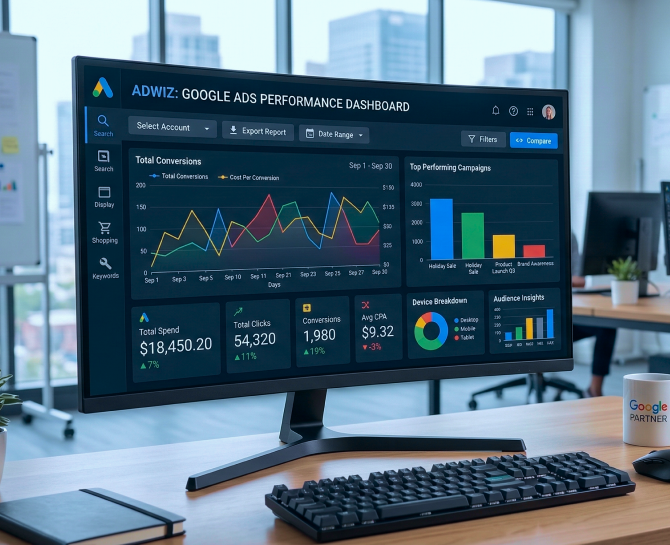
A Google Ads reporting tool transforms raw campaign data into charts, graphs, and performance summaries. Instead of scanning rows of numbers, marketing teams can quickly spot trends, compare campaigns, and identify performance changes.
Visual reporting also makes communication easier.
Managers, clients, and non-technical stakeholders can understand campaign results faster when insights are presented through clear dashboards rather than complex spreadsheets.
Benefit 5: Enhances Team Collaboration
Performance data from Google Ads is often reviewed by campaign managers, marketing leaders, analysts, and sometimes external clients. When reports are stored in separate spreadsheets or shared manually, it becomes difficult to keep everyone aligned.
A Google Ads reporting tool centralizes campaign insights in one place.
Teams can access the same dashboards, review the same metrics, and track performance using a consistent reporting format. Better visibility also improves communication. Marketing teams can discuss results, identify issues faster, and collaborate more effectively when campaign performance is clearly shared across the team.
Benefit 6: Supports Data-Driven Decision Making
Marketing decisions should be guided by data, not assumptions.
Platforms like Google Ads generate valuable performance metrics. However, when this data is scattered across multiple reports or spreadsheets, it becomes difficult to identify clear patterns.
A Google Ads reporting tool organizes this information into structured insights.
Marketing teams can quickly analyze trends such as which campaigns generate the highest conversions, which keywords deliver the best return on ad spend, and which audiences respond most effectively to ads.
With clearer insights, decisions become more confident and strategic. Teams can allocate budgets more effectively, refine targeting strategies, and continuously improve campaign performance based on reliable data.
Benefit 7: Enables Customizable Reports For Different Stakeholders
Not everyone reviewing campaign performance needs the same information.
A marketing manager may want detailed campaign metrics from Google Ads, while senior leadership may only need a quick overview of conversions, spend, and return on ad spend.
Creating different versions of reports manually can take time.
A Google Ads reporting tool allows teams to customize reports based on the audience. Teams can highlight specific metrics, adjust dashboards, and generate reports that match the needs of managers, executives, or clients.
This flexibility makes reporting clearer and more efficient. Each stakeholder receives the insights that matter most without unnecessary complexity.
Benefit 8: Tracks Multiple Campaigns In One Place
Marketing teams rarely manage just one campaign.
Most accounts inside Google Ads run multiple campaigns at the same time. These may target different products, audiences, locations, or marketing goals. Monitoring each campaign separately can quickly become difficult.
A Google Ads reporting tool brings all campaign data into one dashboard.
Marketing teams can review performance across campaigns, compare results, and identify which strategies are delivering the strongest outcomes. Instead of switching between different reports, teams can track everything in a single view.
This centralized visibility makes campaign management far more efficient, especially as advertising operations grow.
Benefit 9: Reduces Human Errors In Reporting
Manual reporting often introduces small mistakes that can lead to larger problems.
When teams export data from Google Ads and organize it in spreadsheets, errors can occur during copying, formatting, or calculations. Even minor inaccuracies can affect how campaign performance is interpreted.
A Google Ads reporting tool reduces this risk.
Data is pulled directly from the advertising platform and automatically updated in dashboards and reports. This minimizes manual handling and improves the accuracy of campaign metrics.
With more reliable data, marketing teams can trust their reports and make decisions with greater confidence.
Benefit 10: Scales Easily With Growing Marketing Operations
As marketing campaigns grow, reporting becomes more complex.
New campaigns, additional ad groups, and larger budgets create more performance data inside Google Ads. Managing this information through manual reports becomes increasingly difficult.
A Google Ads reporting tool is designed to handle this growth.
Marketing teams can track more campaigns, monitor additional metrics, and generate reports without increasing manual workload. Dashboards update automatically, regardless of how many campaigns are running.
This makes it easier for teams to maintain clear reporting even as advertising operations expand.
Ways to Find The Right Google Ads Reporting Tool
Choosing a reporting tool is not just about generating reports. The right platform should help marketing teams analyze campaign performance faster and make better decisions.
Several factors can help determine whether a tool is the right fit.
Seamless Google Ads Integration
The tool should connect directly with Google Ads so campaign data flows automatically into dashboards and reports. Direct integration ensures the information remains accurate and continuously updated.
Customizable Dashboards
Different teams track different metrics. A good reporting tool should allow marketers to customize dashboards based on what matters most, such as conversions, cost per acquisition, click-through rate, or return on ad spend.
Automated Reporting
Manual reporting can quickly become repetitive. Tools that allow scheduled reports help marketing teams automatically send performance updates to managers or clients on a weekly or monthly basis.
Multi-Account Management
Agencies and larger marketing teams often manage several ad accounts at once. A reporting tool should make it easy to monitor multiple campaigns and accounts from a single dashboard.
Clear Data Visualization
Campaign insights are easier to understand when presented visually. Tools that offer charts, graphs, and performance summaries help teams quickly identify trends and changes without reviewing large datasets.
Cross-Platform Insights
Some reporting tools integrate with platforms such as Google Analytics or CRM systems. This helps marketing teams connect advertising performance with website behavior and conversions.
Pro Tip : When these features come together, reporting becomes far more efficient. Marketing teams can access insights quickly, communicate results clearly, and focus more on optimizing campaign performance.
Conclusion
Advertising data holds the answers most marketing teams are looking for. The challenge is not access to that data. The challenge is turning it into insights that actually guide decisions.
When reporting becomes slow and manual, valuable opportunities remain hidden inside campaign metrics. Teams spend time organizing numbers rather than understanding what those numbers reveal about performance, audience behavior, and campaign effectiveness.
A structured reporting system changes that experience. Clear dashboards, automated insights, and centralized data make it easier for marketing teams to see what is working and what needs attention. Reporting becomes a tool for decision making instead of a routine task that delays it.
This shift is where smarter growth begins.
At DiGGrowth, the focus is on helping marketing teams transform complex campaign data into insights that drive measurable results. When reporting becomes clearer, strategies become stronger and marketing investments deliver greater impact.
If your team is ready to simplify reporting and unlock deeper campaign insights, start the conversation today at info@diggrowth.com.
Ready to get started?
Increase your marketing ROI by 30% with custom dashboards & reports that present a clear picture of marketing effectiveness
Start Free Trial
Experience Premium Marketing Analytics At Budget-Friendly Pricing.

Learn how you can accurately measure return on marketing investment.

How Predictive AI Will Transform Paid Media Strategy in 2026
Paid media isn’t a channel game anymore, it’s a chessboard. Search, social, programmatic, video, influencer, native,...
Read full post post
Don’t Let AI Break Your Brand: What Every CMO Should Know
AI isn’t just another marketing tool. It’s changing how we connect with customers, personalize content, and...
Read full post post
From Demos to Deployment: Why MCP Is the Foundation of Agentic AI
A quiet revolution is unfolding in AI. And it’s not happening inside research labs. For decades,...
Read full post postFAQ's
Leadership teams should focus on metrics tied to revenue and growth, such as cost per acquisition, return on ad spend, and conversion value. Clear reporting connects advertising performance to business outcomes, making it easier to evaluate the true impact of marketing investments.
The main challenge is managing large volumes of campaign data across multiple accounts and campaigns. Without structured reporting, teams spend excessive time compiling data instead of analyzing performance and improving strategy.
Detailed campaign reporting helps reveal underperforming keywords, ad groups, or audiences that consume budget without generating conversions. These insights allow teams to quickly reallocate spend toward better-performing campaigns.
Clear reporting helps leaders identify performance trends, understand audience behavior, and evaluate campaign effectiveness. These insights guide smarter budget allocation and long-term marketing planning.
As campaigns expand, data complexity increases. Scalable reporting systems help teams monitor performance across multiple campaigns without increasing manual workload, ensuring insights remain accessible as operations grow.